
City virtual tours: show your destination at its best
- Immersive Websites
- Virtual Tours
From Bruges and Mechelen to Avoriaz and Méribel: see how a city-wide virtual tour connects photography, heritage and visit planning in your destination’s own identity. And what it adds to Google Maps.
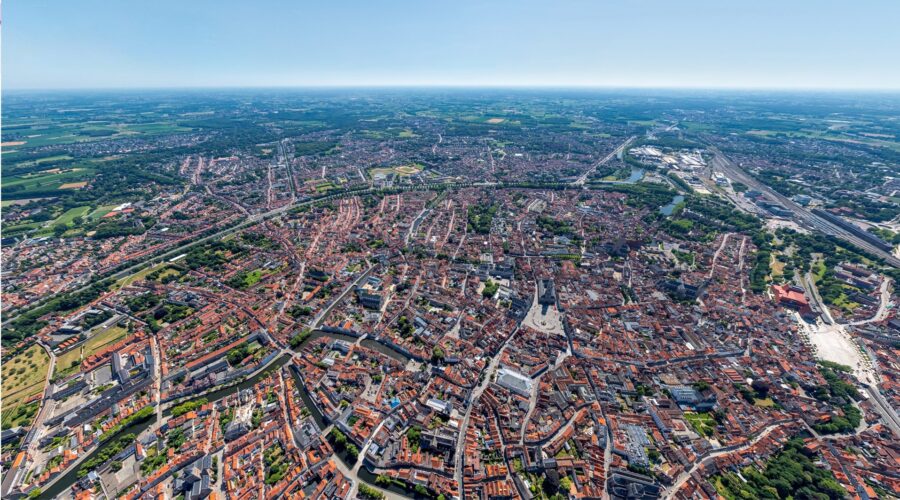
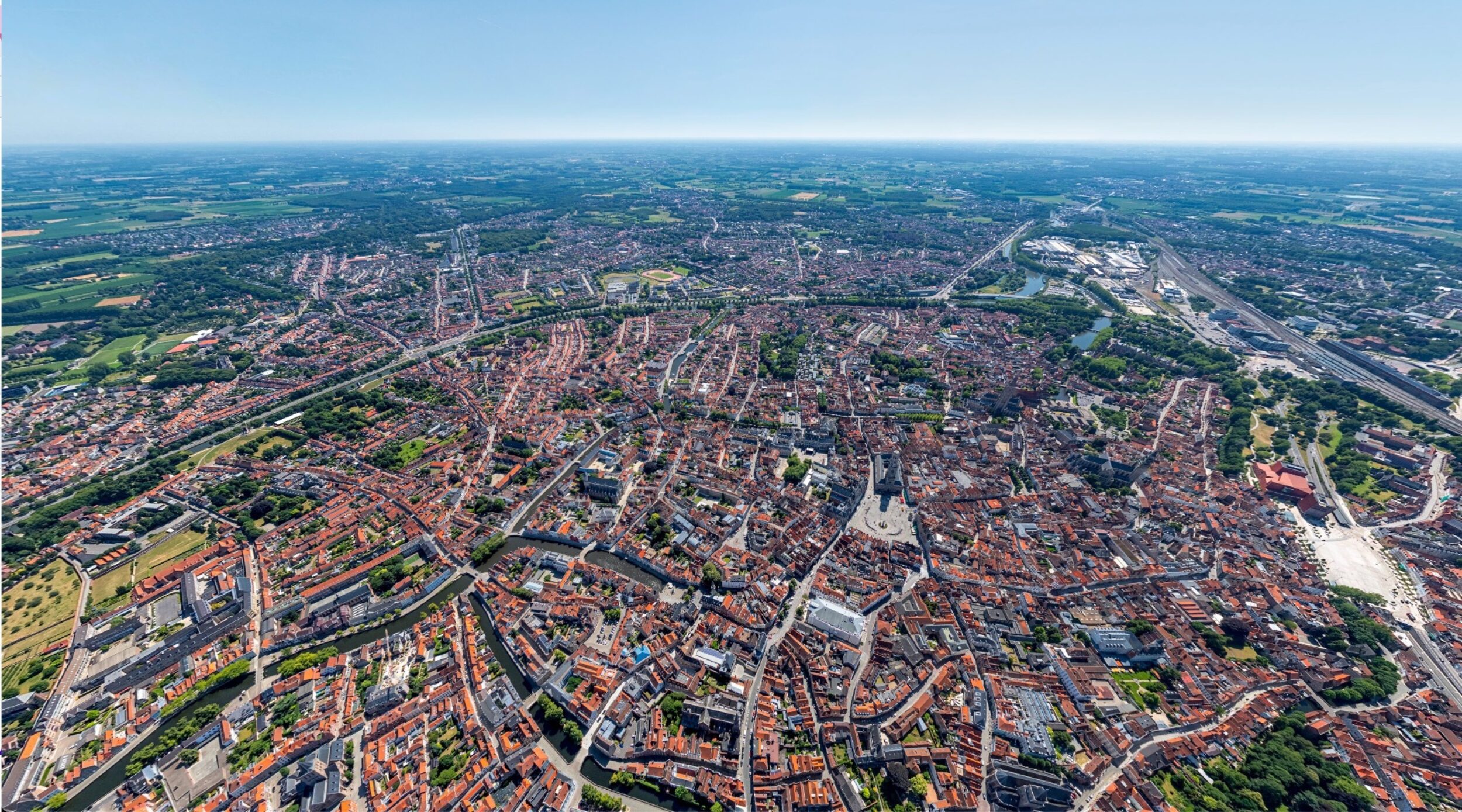
Give people a reason to visit
Morning light on the canals of Bruges. An unexpected museum interior in Mechelen. The view across Avoriaz, with the village and ski slopes in a single panorama. These places give a destination its character. They deserve the same care online as they do in person.
A city virtual tour connects those places in one recognisable experience. Visitors discover the atmosphere, understand where things are and decide what to explore. You shape the photography, design, stories and next steps.
Poppr has built these experiences for Bruges, Mechelen, Geraardsbergen, Ronse, Avoriaz and Méribel. They show how much a destination can communicate when imagery, navigation and content are designed together.
What is a city-wide virtual tour?
A city-wide virtual tour connects selected squares, landmarks, museums, viewpoints, accommodation and activities through interactive 360° imagery. Visitors move from an overview directly to a place, look around and explore relevant information.
It does not require photographing every street or building. The value lies in the selection and the connections. A visitor should be able to understand how the historic centre, a museum and a walking area relate to each other.
Navigation follows the questions your audience brings. What should I see? Where can I go inside? What would work for a day with children? A map, clear categories and direct entry points give people both an overview and the freedom to explore.
What does a custom city tour add to Google Maps?
Google Maps is valuable for finding addresses and planning routes. A custom virtual tour has another purpose: presenting your destination in the way you want people to discover it. Here is how it compares with the standard Google Maps and Street View experience.
| Aspect | Standard Google Maps / Street View | A custom virtual tour |
|---|---|---|
| Purpose | Finding places, getting your bearings and navigating. | Inspiring visitors, telling stories and preparing a visit. |
| Design | Google’s familiar interface. | Your destination’s visual identity, typography and atmosphere. |
| Navigation | Searching the map and moving through available imagery. | Direct access to highlights, themes, interiors and viewpoints. |
| Photography | Images from Google and different contributors. | A planned collection with deliberate choices of light, season and finish. |
| Editorial control | Presentation within Google’s available features and selection. | Your own selection, opening view, sequence and content. |
| Next step | Actions within the available Maps features. | Contextual links to museums, tickets, accommodation or routes. |
Google also hosts professional photography, and its developer platform supports custom experiences. The distinction is the complete, carefully designed experience. The two channels can work together: let people explore through your own tour and use Maps to help them get there.
Bruges: image quality starts before the shoot
A compelling panorama takes more than a good camera. Viewpoint, light, weather, crowds, composition and editing all shape how a city comes across. Sometimes an aerial perspective makes the geography clear. Elsewhere, a carefully chosen position at eye level tells the story.
Virtual Bruges demonstrates this approach, with 20K photography and perspectives captured using drones, a helicopter and elevated camera poles. City views, heritage and interiors form one destination experience.
Within the agreed scope, Poppr produces 20K source panoramas: 20,000 by 10,000 pixels, or 200 megapixels. This provides rich detail to explore. Web delivery is adapted to the device and the part of the image being viewed. Resolution can vary across older, existing scenes.
The quality comes from that combination: detailed source photography and a presentation that does the city justice.
Mechelen: a digital experience with the city’s identity
A destination has a character of its own. Its colours, typography, buttons and tone of voice should reflect that. A custom tour can align with the tourism website and city branding, giving visitors a coherent experience.
For Virtual Mechelen, the platform received a refreshed design, smoother navigation and new locations. Existing photography that still worked well remained in use. This is a practical advantage: updating an interface does not have to mean reshooting an entire city.
Visitors move from views of the city to distinctive interiors and attractions. The platform also gives the tourism team ways to manage content. That creates an experience which can evolve with the destination, with value extending beyond the launch campaign.
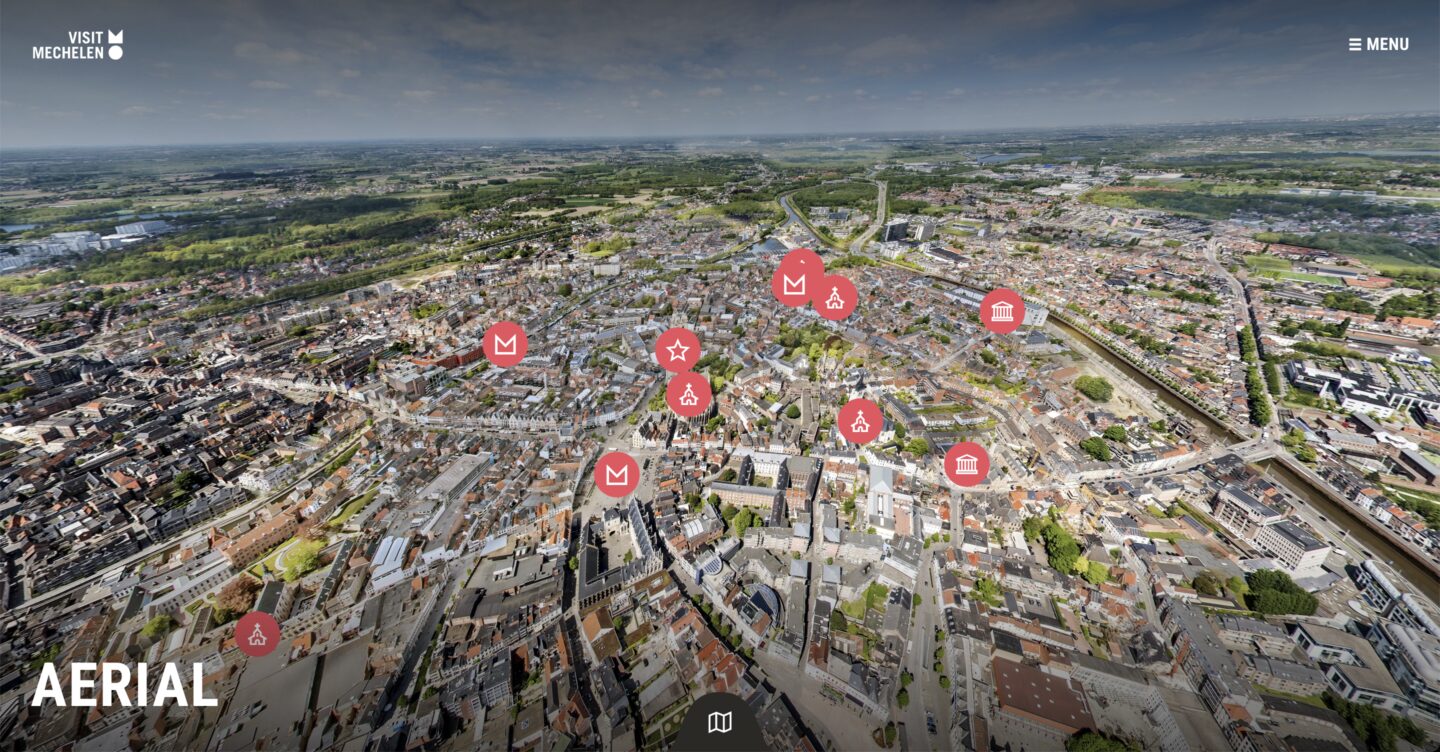
Virtual Mechelen brings city identity, navigation and photography together in one custom experience.
Avoriaz and Méribel: making a whole destination understandable
In a mountain destination, visitors also need to understand changes in elevation, villages, slopes and the location of accommodation. An address tells only part of that story. A panorama lets them explore the surroundings for themselves.
The Avoriaz virtual tour connects the village, ski slopes, accommodation and activities. Summer and winter imagery shows how the destination changes through the year. The experience was later extended with Avoriaz Quest, an interactive treasure hunt. The existing tour became the foundation for a new campaign.
In Méribel, the tour helps visitors understand the four villages and mountain areas in context. Multilingual information and contextual points of interest guide exploration. Through its own CMS, the destination team can add information points itself.
For destinations like these, the useful questions are clear: where do I want to be, what is nearby and how does it fit the stay I have in mind?
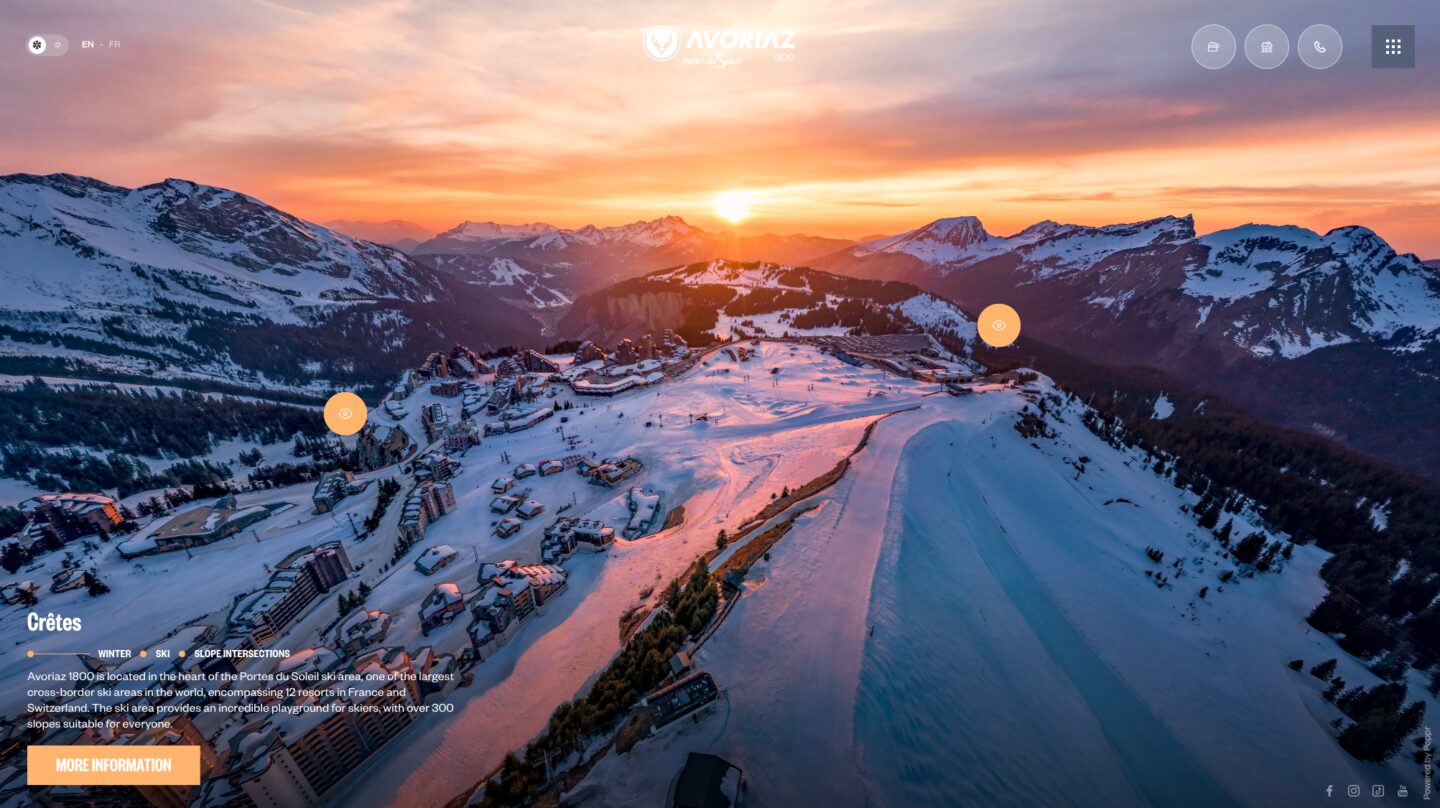
The Avoriaz virtual tour shows ski slopes and mountain scenery in their wider setting.
Geraardsbergen and Ronse: start with a focus, then grow
A city-wide experience can work for smaller destinations too. Begin with a strong selection, then extend it as new locations, stories or budgets become available.
Virtual Geraardsbergen is an example of a platform built to grow. The city started with selected buildings and later added locations to the existing tour. Its official tourism website directs visitors to the experience.
In Virtual Ronse, an aerial overview connects the city with heritage interiors, including the crypt, St Hermes Basilica and the textile museum. A map and language options help visitors find their way.
The practical lesson is to choose the places that tell the city’s story together. Then establish how the platform will expand, who will update content and how future photography will be added.
Useful for visitors, heritage and professional audiences
A good city tour helps people make choices before they arrive. What does a square look like? What is the atmosphere inside a museum? What should I make time for? This makes the experience useful on tourism pages, in campaigns and through partner organisations.
There are concrete applications. Visit Bruges points people to Virtual Bruges to preview features such as paving and museum spaces. That can support preparation, alongside practical accessibility information.
The Bruges City Film Office uses 360° links for filming locations. Location scouts can make an initial exploration remotely. The same approach is relevant for journalists, tour operators and organisers who need to assess or present a destination.
The photography can also serve other communications, from additional web pages to print materials, subject to agreed usage rights and suitable image formats.
Give interest a useful next step
An attractive image earns attention. What happens next determines whether that attention serves a purpose. Add ticket information or opening hours at a museum, a walking route at a viewpoint and accommodation details where a visitor is considering a stay.
Match each action to the location and the visitor’s intent. One relevant link can be more useful than five generic buttons. Give partner websites direct entry points too, so their visitors arrive at the appropriate location.
Decide what to measure before launch: locations viewed, information points used and clicks to relevant pages. Virtual tour heatmaps can add insight into what attracts attention.
A ticket click is not a ticket sale. Where possible, connect the next step to the intended outcome, then use the findings to improve content and navigation. This gives the platform a defined role in your visitor strategy.
Plan for the years after launch
A city changes. Museums reopen, squares are redesigned and new routes deserve attention. Agree who will manage text, links and translations, how outdated photography will be replaced and what support is included.
Include four practical requirements in the brief:
- Mobile use: test navigation, text and buttons on real phones.
- Performance: load suitable image resolutions and detail when needed. A large source file does not have to be delivered in full to every visitor.
- Accessibility: provide clear controls, readable information and a usable alternative for essential visual content.
- Search visibility: support the tour with indexable location pages, descriptive text and relevant internal links.
An interactive panorama experience works alongside a clear tourism website. Design the two to support each other. Also establish who has platform access, which usage rights apply and how content can be handed over. These decisions make the investment easier to manage over time.
Frequently asked questions about city virtual tours
Do we need to photograph the entire city at once?
No. Start with a coherent selection of important places. Choose a structure that can accommodate more districts, buildings or themes later. A city-wide tour is about connections and orientation, rather than covering every metre of every street.
Can the tour work alongside Google Maps?
Yes. Use your own tour to present and explore the destination, with Google Maps providing route planning, for example. Depending on the agreement, suitable photography can also be distributed through several channels.
What determines the scope of a project?
The number of viewpoints, interiors, aerial images, seasons and languages, alongside design, information, integrations and content management. A clear selection and phased expansion keep the scope manageable. Discuss both the initial production and ongoing updates.
Which places show your city at its best?
Start with the places that tell visitors something meaningful: an iconic view, an unexpected interior, a lively square or a landscape that defines the destination. Connect them to your audience’s questions and the actions you want to support.
Poppr brings experience from Bruges, Mechelen, Geraardsbergen, Ronse, Avoriaz and Méribel, covering photography, design, navigation, content and future expansion.
Tell us which destination you want to show, who you want to reach and what you want to achieve. We can then discuss a suitable first scope and how it could grow.
Explore our approach to custom virtual tours.